Microsoft Dynamics 365 Business Central
Inventory
Dashboard.
Understand your stock.
Make better inventory decisions.
Turn inventory data into clear KPIs and reports — for supply chain, operations and finance teams.
Availability.
Coverage.
Efficiency.
01 / Inventory at a glance
Start with the signals that matter.
A central dashboard brings inventory performance into view. Sort and filter KPIs, then drill down to the items behind the numbers.
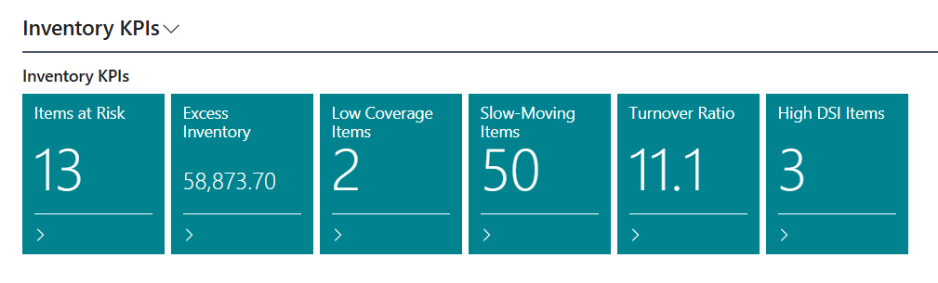
Stock-out risk
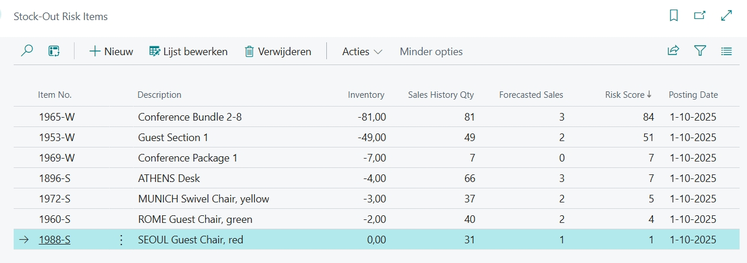
Identify items at risk of running out based on recent sales trends.
Excess inventory
Find stock that may be tying up too much capital.
Coverage days
See how long current inventory will last against historical demand.
Slow-moving items
Detect items with low sell-through rates.
Inventory turnover
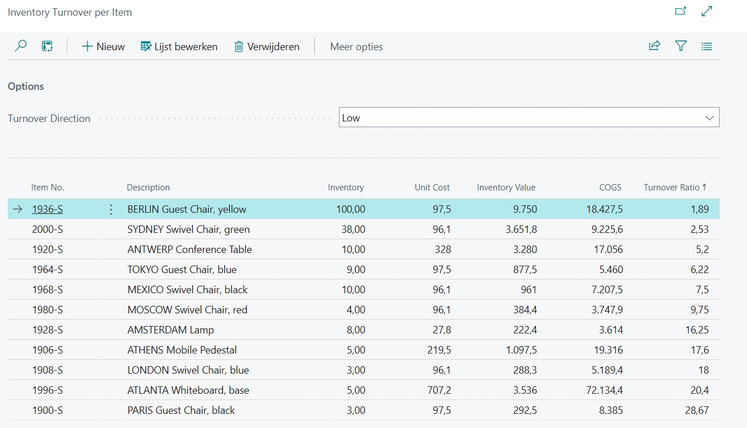
Measure how efficiently inventory is converted into sales.
Days sales in inventory
Monitor inventory holding periods with DSI.
02 / Item-level analysis
See where action is needed.
Detailed list pages cover stock-out risk, excess inventory, coverage days, slow-moving items, turnover and high DSI items.
Reports & configuration
Make the analysis
fit your business.
Reports for further analysis
Export stock-out risk, excess inventory, coverage days, slow-moving items, inventory turnover and DSI reports to PDF or Excel.
Flexible setup
Configure sales history, forecast period, coverage limits, slow-moving thresholds, consumption instead of sales, top-item counts, maximum turnover ratio and DSI threshold. Different costing and sales calculation methods are supported.
Built for Business Central
Uses standard Business Central tables and processes, works inside the customer’s tenant and requires no external services or data transfers. Compatible with Essentials and Premium editions.
Benefits
Balance availability, cost and efficiency.
Use inventory insights to support purchasing and replenishment decisions.
Anticipate shortages
Reduce stock-out risk and improve service levels through clearer coverage insights.
Free up working capital
Identify excess and slow-moving inventory earlier, helping reduce holding costs and potential write-offs.
Reduce manual analysis
Give operational and financial teams a shared view of inventory performance, with less spreadsheet work.
Product demonstration
Watch the dashboard workflow.
Explore Inventory Dashboard in the original video demonstration.
Get started
A clearer view of your inventory.
Contact us about the extension package and installation in your Business Central environment.
Discuss Inventory Dashboard ↗